I have recently posted a video briefly explaining how we use GNNs (Graph Neural Nets) at Fetch to identify duplicate receipts. I have mentioned  HuggingFace in passing there, but in fact I use it quite heavily to make my machine learning life simpler.
The Problem: Suitcases Without Handles
AI workloads are data heavy, involving large amounts of images, annotations, and interconnected data, stored in disparate files and databases across local machines and cloud services. The data requires cleaning, division into training, validation, and testing sets, and multiplies with each training cycle.
Additionally, training numerous models with varying hyperparameters generates further artifacts to track.
As if that were not enough, we create applications to monitor and compare our models’ performance, visualize and analyze data, adding to the pile of accumulated artifacts.
This leads to two primary challenges:
- tracking all artifacts and
- maintaining the developed solutions.
These issues become more pronounced when transitioning the solution to different people or machines, even with cloud sharing services like AWS S3. And this is how managing AI workloads resembles handling heavy luggage without handles: infuriating to shlepp around but impossible to discard.

The HuggingFace Solution
For the last year, I have been using HuggingFace to bring some order into this chaos. HuggingFace has practically become my lab for all things deep learning. The most attractive features are a comprehensive playground as well as the ease of use through their UX and API. HuggingFace provides facilities for:
- Datasets – for storing & sharing data
- Models – for keeping track of models
- Spaces – for developing apps for visualization and showcasing the models
Below is the overview of some basic tech I use.
Datasets
Creating
Datasets API works great for making your data follow you wherever you go. In my work at Fetch I mostly deal with images and text. Regardless of what I end up using for training (images, text, graphs, etc.) once data is extracted, I create and upload a HuggingFace dataset.
HuggingFace supports a few data formats out of the box. It also allows for creating custom ones. I like to reuse the former rather than create my own. Imagefolder serves my purposes perfectly.
To store images of documents (pictures of receipts), I collect all the images in a single folder and create a metadata.jsonl file in the same folder. This file connects all the non-image data I need with each image. The only stricture here is that there should be a 1-1 correspondence between image files in the directory and lines in the metadata file.
Each line in the file is a JSON object. I create each object with 2 fields: file_name – image file name (required by Imagefolder format), and ground_truth where I stuff all of the non-image features. I believe it is possible to have more than 2 fields (never checked that), as long as the number of fields remains constant throughout the file, since the data is going to be packaged into a columnar ApacheArrow format and it implies a constant number of columns.
{"file_name": "1.jpg", "ground_truth": "\"{some JSON object serialized to string}\""}
{"file_name": "2.jpg", "ground_truth": "\"{some other JSON object serialized to string}\""}
So, to store additional data, I package the entire structure into a Python object and then flatten it into a string:
metaddatas = []
for fn in images:
    metadata = {}
    metadata["user_id"] = user_id
    metadata["some_data"] = some_data
    metadata["and_more_data"] = more_data
    gt_str = json.dumps(metadata).encode("utf-8", "ignore").decode("utf-8")

    metadata_str = json.dumps({"file_name": fn, "ground_truth": gt_str}) + "\n"
    metaddatas += [metadata_str]

with open(metadata_fn, "w") as f:
    f.writelines(metaddatas)
Uploading
To upload the dataset to your organization account (or your own), you need to be either logged in with huggingface-cli, or, my preferred way, use a token. The token is easlity obtained by going to Settings -> Access Tokens in the HuggingFace profile:
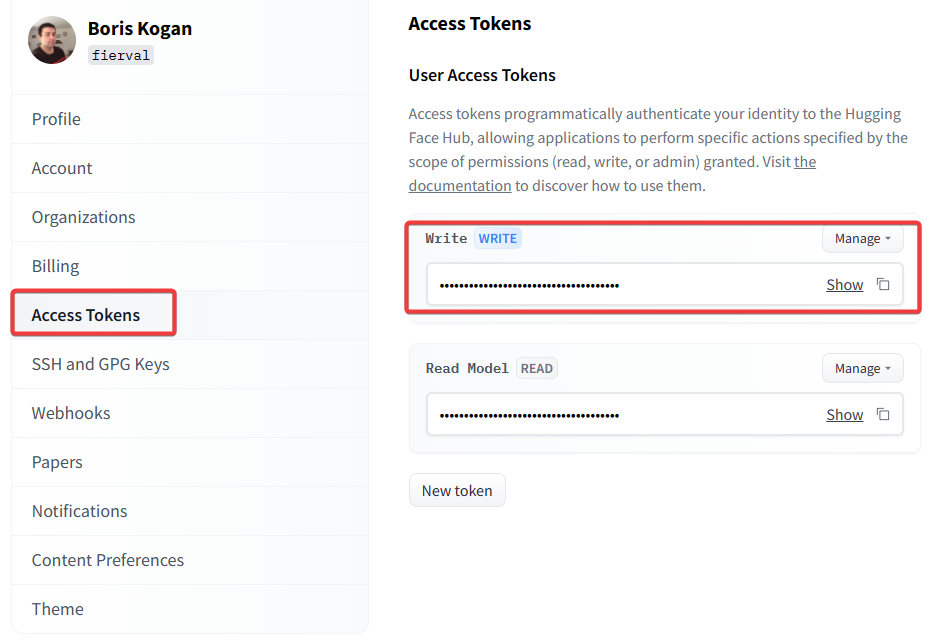
Manage this token through your environment variables, .env files and python-dotenv package. If, for example, your .env file contains something like:
HF_AUTH_TOKEN="some_alphanumeric_sequence"
do something similar in Python:
from dotenv import load_dotenv
load_dotenv()
hf_token = os.environ.get("HF_AUTH_TOKEN", None)
After that, you can create your dataset storage (which is a Git repo) on HuggingFace and upload the data:
from datasets import load_dataset
from huggingface_hub import HfApi

my_repo = "my_account/my_dataset"
api = HfApi()
api.create_repo(repo_id=my_repo, token=hf_token, repo_type="dataset", private=True, exist_ok=True)

dataset = load_dataset("imagefolder", data_dir=images_and_metadata_root)
dataset.push_to_hub(my_repo, token=hf_token)
Here datasets and huggingface_hub are modules contained in the respective Python packages. I believe you only need to install datasets, huggingface_hub will be installed as part of its dependencies.
Here lines 5-6 will create a private dataset repo if it doesn’t already exist, while the final 2 lines will package the data in ApacheArrow format, shard it if necessary, and upload.
Train/Validation/Test Splits
There are facilities to create splits before or after the dataset has been uploaded (i.e., after downloading it locally).
I found it practical to pre-split the data locally and then upload everything in one shot. The only thing that changes is data organization. The root directory (images_and_metadata_root) needs to have train, validation, and test subdirectories. Each containing their own images and metadta.jsonl files – one per subdirectory. Then the code above can be used to upload everything in one shot, maintaining the splits.
Single File Storage
Sometimes it may be convenient to package a dataset as a single file, e.g. with PyTorch Geometric, the Graph Neural Network library for graph learning, uses PyTorch to store data as binary files. Since HuggingFace repositories are just Git repositories, it is easy to adopt them for storing these files as well. The code is very similar to the one above:
api = HfApi()

# local .pt file containing the data
local_fn = my_graph_dataset_file

# name without any path
out_fn = os.path.basename(local_fn)

# where to store it in 'my_repo'
path_in_repo = f"{subfolder}/graphs/{out_fn}"

api.upload_file(path_or_fileobj=local_fn, repo_id=my_repo, repo_type="dataset", path_in_repo=path_in_repo, token=hf_token)
Download & Transform
Now that the dataset is in the cloud and can follow you anywhere you go, it is easy to download and transform it into anything you want.
HuggingFace uses local cache to store the data, so you only take a perf hit the first time you download it.
from datasets import load_dataset

hf_dataset = load_dataset("my_account/my_dataset", use_auth_token=hf_token)
We can easily recover all the fields we packed into a string and convert the result to whatever we like.
features = hf_dataset.map(lambda x: json.loads(x["ground_truth"]))
feats_dict = [{"user_id": x["user_id"],
                          "some_data": x["some_data"],
                          ""and_more_data": x[""and_more_data""]}
             for x in hf_dataset["train"]]

#Convert to pandas dataframe
df = pd.DataFrame(featds_dict)
To be continued
I’ll cover Models and Spaces in the second part of this post.

 Viral F#